Crowd selfie
Sony Xperia C5 Ultra review: Crowd selfie
The Album image gallery is lovely
The Sony Xperia C5 Ultra comes with the custom Sony gallery, called Album. Images are organized into groups of thumbnails and sorted by date. You can resize the image thumbnails with a pinch gesture all the way from a grid of tiny, tiny thumbnails to a single image view.





Gallery views with different thumbnail size • Places
The gallery can pull images from your Facebook, Picasa or Flickr accounts for easy viewing in one spot. Alternatively, you can turn the C5 Ultra into a DLNA server and view photos from the device on a computer or compatible TV.
Also there are some special albums - Places, for one, which uses the geotagging info to sort photos by where they were taken, and Faces is another, which groups photos by the faces of the people in them.
Images can be cropped or rotated directly in the gallery. Quick sharing via Picasa, Email apps, Facebook, Bluetooth or MMS is also enabled. A simple slideshow mode with no transition settings is present as well.
There's also an image editor, which provides basic tools for enhancing your photos like cropping and color effects, but also a bit more advanced features like curves adjustment.

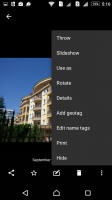


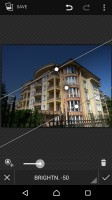
Viewing and editing an image
We like the Movies app, lacks AC3 audio though
The video playing app is dubbed Movies and it has a simple interface, but is strong on codec support and subtitle handling. It's connected to Gracenote, which helps you find additional information about the movies and TV shows you have on the tablet.
The Xperia C5 Ultra plays just about everything - AVI (DivX, XviD), MP4, WMV and even MKV and MOV. AC3 audio is not supported but you can still view the video, if it's necessary. The video player does support fully-customizable subtitles.
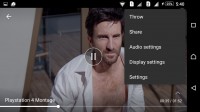

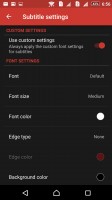
Video player
Music app is great, as usual
The music player app is named simply Music, the Walkman badge has gone into oblivion. That said, the app offers largely the same interface and core functionality as before. The interface is based on tiles that sort your music collection by Artist, Albums, Playlists, all songs and even the songs your friends are listening to (but you need to link your Facebook account).
When there's music playing, the album art serves as background for the lockscreen, with controls appearing right there. The notification area also offers the now playing screen with music controls and the option to jump into the Walkman player.
The Now Playing screen shows a carousel with the tracks in the current playlist and the usual music controls below that. You can swipe left and right to move between tracks. The Infinite button will help you find the music video on YouTube, look up info about the artist on Wikipedia and search for lyrics on Google.
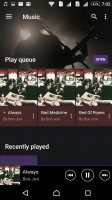
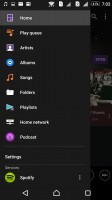
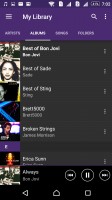

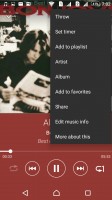
Music player looks good and works even better
Gracenote is used here too and it can automatically download information about your tracks and album art or you can edit it manually.
Sony has improved the Walkman player's settings. There's the familiar ClearAudio+ option, which determines the best audio quality settings depending on the song you're listening to. Dynamic normalizer evens out the volume differences between tracks, which is great if you've mixed multiple albums from multiple sources.
The Sound enhancements offer even more settings. There's an equalizer with presets and manual settings (including tweaking Clear Bass). There's Surround sound mode too, which imitates the Studio, Club or Concert Hall experience. Dynamic normalizer minimizes the difference in volume between songs (great if you're playing a shuffled mix).
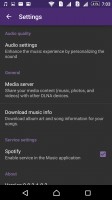
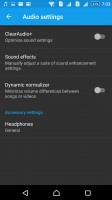
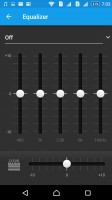
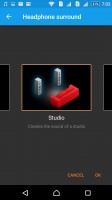
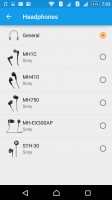
A multitude of sound-enhancing features
FM radio with RDS and TrackID
The Sony Xperia C5 Ultra features an FM Radio aboard, complete with RDS support. The app has multiple skins and integrates with TrackID to recognize the currently playing song. You can even directly make an "I'm listening to..." post on Facebook.
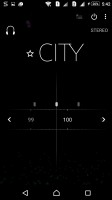
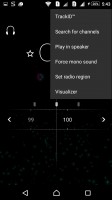
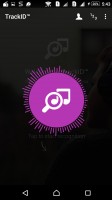

The FM Radio • recognizing a song with TrackID
Audio output starts off great, loses brilliance with headphones
The Sony Xperia C5 Ultra did splendidly when connected to an active external amplifier. The scores it got were great top to bottom and it matched them with excellently high volume and no weak spots whatsoever.
Plugging in a pair of headphones did harm the stereo crosstalk and frequency response, while also adding some intermodulation distortion. None of the readings are too bad, but we are used to seeing less degradation in this case. Volume levels dropped to below average too, which left us with less than impressive performance on this occasion.
And here go the results so you can see for yourselves.
| Test | Frequency response | Noise level | Dynamic range | THD | IMD + Noise | Stereo crosstalk |
| +0.17, -0.02 | -92.1 | 93.5 | 0.0088 | 0.013 | -88.7 | |
| +0.80, -0.03 | -92.3 | 93.2 | 0.010 | 0.416 | -60.8 | |
| +0.06, -0.06 | -94.1 | 93.9 | 0.0086 | 0.013 | -93.4 | |
| +0.53, -0.30 | -93.5 | 93.4 | 0.033 | 0.506 | -54.1 | |
| +0.02, -0.08 | -85.2 | 85.2 | 0.013 | 0.022 | -85.3 | |
| +0.10, -0.01 | -85.4 | 85.4 | 0.020 | 0.045 | -45.1 | |
| +0.06, -0.02 | -94.0 | 93.9 | 0.0012 | 0.0065 | -73.4 | |
| +0.11, -0.06 | -93.8 | 93.8 | 0.0022 | 0.099 | -65.1 | |
| Samsung Galaxy Alpha | +0.01, -0.04 | -96.6 | 92.8 | 0.0058 | 0.0091 | -97.1 |
| Samsung Galaxy Alpha (headphones attached) | +0.04, -0.01 | -95.7 | 92.7 | 0.013 | 0.033 | -65.6 |
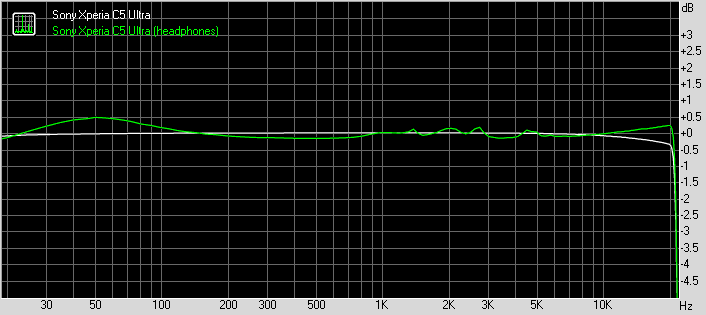
Sony Xperia C5 Ultra frequency response
You can learn more about the tested parameters and the whole testing process here.


Tip us
2.1m 180k
RSS
EV
Merch
Log in I forgot my password Sign up