GSMArena.com GSMArena.com

Tip us

2.1m
180k
RSS

EV

Merch

Log in

Login

I forgot my password
Sign up
  • Home
  • News
  • Reviews
  • Videos
  • Featured
  • Phone Finder
  • Deals
  • Merch
  • Coverage
  • Contact
ADVERTISEMENT
GSMArena team, 6 October 2014

Assembly line


Asus Memo Pad 7 ME176C review: Assembly line

  • Comments (5)
  • User reviews
  • Memo Pad 7 ME176C

6. Email, text input
  1. 1. Introduction
  2. 2. Unboxing, design and controls
  3. 3. Display, battery life, connectivity
  4. 4. User interface
  5. 5. Performance
  6. 6. Email, text input
  7. 7. Multimedia apps, audio quality
  8. 8. Camera and video recording
  9. 9. Web browsers, other apps
  10. 10. Conclusion
  11.  
  12. Asus Memo Pad 7 ME176C specification
  13. User opinions and reviews
  14. Review comments (5)

Asus Android

Email and text input

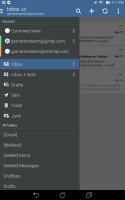
There is no messaging app on the Asus Memo Pad 7 ME176C but you get two email clients to work with. The standard client has a clean simple white interface with your email folders on the left and your list of messages on the right. If you add more than one account and you get a combined view of all your emails from each accounts. The Email app can handle Exchange, POP or IMAP inboxes.

Asus Memo Pad 7 ME176C Asus Memo Pad 7 ME176C
The standard email app

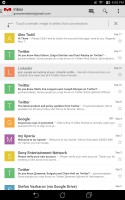
The Gmail app has handy shortcuts at the bottom of the screen and supports batch operations, which allow multiple emails to be archived, labeled or deleted. The default app supports multiple Gmail accounts, but there's no unified inbox.

Asus Memo Pad 7 ME176C Asus Memo Pad 7 ME176C
Google's Gmail app

Google Hangouts is also here, so you'll have a handy way to message all of your Google and Gmail contacts from one interface.

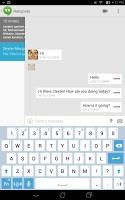
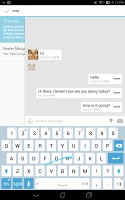
Text input is done through Google's keyboard, which has always been pleasure to use and is one of the most preferred Android keyboards out there. On this screen the keys are comfortably large in both portrait and landscape mode. There is support for swipe typing, handwriting and voice input.
Asus Memo Pad 7 ME176C Asus Memo Pad 7 ME176C
Google keyboard in the Hangouts app

Next Page » 7. Multimedia apps, audio quality
6. Email, text input
  1. 1. Introduction
  2. 2. Unboxing, design and controls
  3. 3. Display, battery life, connectivity
  4. 4. User interface
  5. 5. Performance
  6. 6. Email, text input
  7. 7. Multimedia apps, audio quality
  8. 8. Camera and video recording
  9. 9. Web browsers, other apps
  10. 10. Conclusion
  11.  
  12. Asus Memo Pad 7 ME176C specification
  13. User opinions and reviews
  14. Review comments (5)

Reviews Asus Memo Pad 7 ME176C reviewPage 6
  • Comments (5)
  • User reviews
  • Memo Pad 7 ME176C

Phone finder

  • Samsung
  • Apple
  • Huawei
  • Nokia
  • Sony
  • LG
  • HTC
  • Motorola
  • Lenovo
  • Xiaomi
  • Google
  • Honor
  • Oppo
  • Realme
  • OnePlus
  • Nothing
  • vivo
  • Meizu
  • Ulefone
  • Alcatel
  • ZTE
  • RugOne
  • Umidigi
  • Fairphone
  • Oscal
  • Sharp
  • Micromax
  • Infinix
  • Asus
  • Tecno
  • Doogee
  • Blackview
  • Cubot
  • Oukitel
  • Itel
  • TCL

All brands Rumor mill

ADVERTISEMENT

Popular reviews

Oppo Find X10 Pro Max review
Apple iPhone 18 Pro Max review
Apple iPhone 18 Pro review
ADVERTISEMENT

ELECTRIC VEHICLES

Svolt's 100 kWh semi-solid-state battery enters mass production Svolt's 100 kWh semi-solid-state battery enters mass production Dodge brings its electric and twin-turbo Chargers to EuropeVolkswagen takes the slow road to hands-off driving in China
ADVERTISEMENT
Ads by Playwire

Home News Reviews Compare Coverage Glossary FAQ RSS Youtube Instagram TikTok Facebook Twitter

© 2000-2026 GSMArena.com Mobile version Android app Tools Contact us Merch store Privacy Terms of use
