The music beetle
Sony Ericsson Z530 review

Music in background
Z530 offers very good music features. The phone plays both music and video files pretty well. Files are organized by artist or tracks. Playlists are supported as well. During playback of a music file, the player shows the track name and time progress. Video files cannot be played in full screen mode. Only time progress is shown when playing videos. The Media Player allows running in background when playing a song. It also can play when the phone is closed. Generally, the Media Player application of the phone is intuitive and easy to use. Our device didn't come in its official box so we cannot say for sure if there will be earphones in the package. What we did, though, is to test the phone with K750 earpieces. We played one and the same track on both the SE Z530 and the SE K750. Comparing the sound quality we must say that Z530 does produce a good quality sound but it's somewhat inferior to that of K750. Regrettably, there is no FM radio.
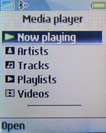
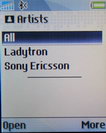
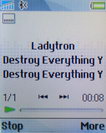
Media player • Playing a song
The weakest link
The phone is equipped with a mere VGA camera. There is an Extended Mode in the camera menu, that raises the resolution up to 1.3 megapixel but that resolution is interpolated which means that the software merely stretches the real 640x480 image in order to reach those dimensions.
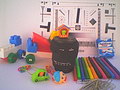
Extended (1.3 MP) vs VGA mode - the extended mode doesn't deliver more detail
The camera interface is made very plain. It displays the current count of pictures that can be taken until the memory is full. The menu lets you choose the size of the picture, the applied effect (if any), and to choose if you want to active the shutter sound. Night mode and self-portrait timer are available also. There is a Shoot Mode submenu with 4 options in it: Normal, Panorama, Frames and Burst. The camera menu is made of two tabs, the first is for taking pictures and the second one is for recording videos.







Sony Eircsson Z530 sample pictures
Video samples (500 KB each)
Instant PC synchronization
Z530 has GPRS Class 10 support for fast data transfers. It also has Bluetooth, Infrared and USB 2.0 connectivity. We tried connecting the phone to a PC via Bluetooth and it was seamless. Phonebook synchronization, data transfer, etc. is very fast and easy. Besides Bluetooth, there is another possibility for connecting your device to PC. The phone allows using the custom USB data cable DCU-60. We haven't tried this variant but most probably it won't have any issues.
A good browser
The phone has a very good web browser. NetFront supports both WAP and HTML modes. Regrettably, the low display resolution does not allow exploring the full abilities of the browser. There is a Smart-fit feature of the application for resizing web pages to the visible area of the display. We tried browsing very complex web pages and they are shown pretty well but require a lot of scrolling.
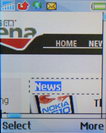
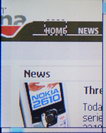
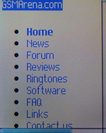
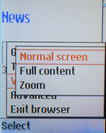
Using NetFront web browser
A handy organizer
The organizer menu of the phone consists of several applications: Calendar, Tasks, Notes, Calculator, Synchronization, Timer, Stopwatch, Applications, Code memo, Alarms. The calendar is semi-synchronized with the phonebook as it asks you if you wish to transfer the birthday date of the contact to the calendar. The Tasks, Notes and Calculator features are very simple and plain. The Synchronization option is for synchronizing through the Internet with a server.
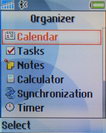
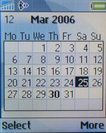
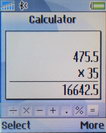
Organizer menu • Calendar • Calculator
In the Applications folder you will find a News Reader which is an application for reading RSS feeds. This is a very useful feature of the phone. The Alarms application has common options but is located in two different places. It's in the Organizer menu as well as in the main menu as a separate icon.
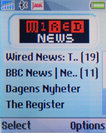

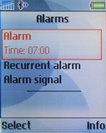
RSS news reader • Alarms
Besides the RSS News reader, the phone has some other preinstalled applications. There is the Media player, the Games, Face Warp (program for making effects on taken pictures), Video DJ (for making video clips, interesting application), Photo DJ (also for applying effect on pictures), Music DJ (composer, very simple and not professional at all) and Remote Control (for controlling PC via Bluetooth).
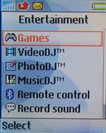
Entertainment menu
Time-eaters
Z530 has four preinstalled games in our firmware version. They are all trial versions only. The games are (1) Neopets, a virtual pet world environment; (2) Neopets-Mobile; (3) Puzzle Slider, a puzzle with a sliced image in pieces which you are to reconstruct back to the original; (4) and, finally, the Quadra Pop, a Tetris like game, which is probably the most amusing game in the phone.
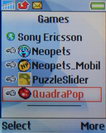
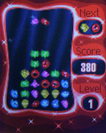
Games menu • Quadra Pop
An easy-going nifty gadget
In conclusion, we must say that the phone definitely has its virtues and will most probably find its own share of dedicated fans. Except for the poor display and camera, the other features of the phone are of good caliber. With its reasonable price Sony Ericsson Z530 will be a popular choice for those who want an entry-level music phone boasting some extra features.


Tip us
2.1m 180k
RSS
EV
Merch
Log in I forgot my password Sign up