Big screen entertainment
Samsung Galaxy C9 Pro preview: Big screen entertainment
Device performance
In terms of performance, we found the Galaxy C9 Pro to be reasonably competent. The phone is perfectly usable for daily use and performs basic tasks with complete ease. Standard activities like opening and closing apps, scrolling, and multitasking are handled quite well and even more adventurous use cases like running two apps in split-screen mode or running six apps side by side in Pop-view mode are also no big deal when you have 6GB of RAM at your disposal. Samsung never quite got around to improving the memory usage of its software but the solution to throw more memory at the problem seems to have worked great.
Games work fine too on the C9 Pro. Most of the games we tried ran perfectly fine without any performance issues.
There is one drawback to all the power under the hood, and that is thermal performance. The C9 Pro stays cool in normal every-day use but push the CPU or GPU hard and the temperatures rise quickly. The top part of the phone can get significantly hot at times, which can be uncomfortable.
GeekBench 4 (multi-core)
Higher is better
-
OnePlus 3T
4364 -
Samsung Galaxy A7 (2017)
4102 -
Samsung Galaxy C9 Pro
3976 -
Samsung Galaxy Note5
3754
GeekBench 4 (single-core)
Higher is better
-
OnePlus 3T
1890 -
Samsung Galaxy C9 Pro
1440 -
Samsung Galaxy Note5
1332 -
Samsung Galaxy A7 (2017)
776
AnTuTu 6
Higher is better
-
OnePlus 3T
165097 -
Huawei Mate 8
91609 -
Samsung Galaxy C9 Pro
85181 -
Samsung Galaxy Note5
81615 -
Xiaomi Mi Max
74488 -
Samsung Galaxy A9 (S652)
64591 -
Samsung Galaxy C7
62818 -
Samsung Galaxy A7 (2017)
60767 -
Sony Xperia XA Ultra
50109
GFX 3.0 Manhattan (1080p offscreen)
Higher is better
-
OnePlus 3T
49 -
Samsung Galaxy Note5
21 -
Huawei Mate 8
18 -
Samsung Galaxy C9 Pro
17 -
Xiaomi Mi Max
15 -
Samsung Galaxy A7 (2017)
14 -
Samsung Galaxy A9 (S652)
13 -
Samsung Galaxy C7
9.8 -
Sony Xperia XA Ultra
7.2
GFX 3.0 Manhattan (onscreen)
Higher is better
-
OnePlus 3T
48 -
Huawei Mate 8
18 -
Samsung Galaxy C9 Pro
17 -
Samsung Galaxy A7 (2017)
15 -
Samsung Galaxy Note5
15 -
Xiaomi Mi Max
15 -
Samsung Galaxy A9 (S652)
13 -
Samsung Galaxy C7
9.6 -
Sony Xperia XA Ultra
7.5
GFX 3.1 Manhattan (1080p offscreen)
Higher is better
-
OnePlus 3T
33 -
Samsung Galaxy Note5
15 -
Samsung Galaxy C9 Pro
11 -
Huawei Mate 8
10 -
Xiaomi Mi Max
9.4 -
Samsung Galaxy A9 (S652)
9.3 -
Samsung Galaxy A7 (2017)
9.1 -
Samsung Galaxy C7
6.2 -
Sony Xperia XA Ultra
4.7
GFX 3.1 Manhattan (onscreen)
Higher is better
-
OnePlus 3T
33 -
Samsung Galaxy C9 Pro
11 -
Huawei Mate 8
11 -
Xiaomi Mi Max
9.4 -
Samsung Galaxy A9 (S652)
9.1 -
Samsung Galaxy A7 (2017)
9 -
Samsung Galaxy Note5
6.7 -
Samsung Galaxy C7
6.1 -
Sony Xperia XA Ultra
5.1
GFX 3.1 Car scene (offscreen)
Higher is better
-
OnePlus 3T
20 -
Samsung Galaxy C9 Pro
5.8 -
Xiaomi Mi Max
5.5 -
Samsung Galaxy A7 (2017)
5.2 -
Samsung Galaxy C7
3.4 -
Sony Xperia XA Ultra
2.5
GFX 3.1 Car scene (onscreen)
Higher is better
-
OnePlus 3T
20 -
Samsung Galaxy C9 Pro
5.8 -
Xiaomi Mi Max
5.4 -
Samsung Galaxy A7 (2017)
5.2 -
Samsung Galaxy C7
3.4 -
Sony Xperia XA Ultra
2.7
Basemark X
Higher is better
-
OnePlus 3T
36958 -
Samsung Galaxy Note5
26281 -
Samsung Galaxy C9 Pro
15814 -
Huawei Mate 8
15593 -
Xiaomi Mi Max
15487 -
Samsung Galaxy A9 (S652)
15290 -
Samsung Galaxy A7 (2017)
14619 -
Samsung Galaxy C7
10445 -
Sony Xperia XA Ultra
6754
Basemark OS 2.0
Higher is better
-
OnePlus 3T
2678 -
Huawei Mate 8
2017 -
Samsung Galaxy Note5
1880 -
Samsung Galaxy C9 Pro
1770 -
Samsung Galaxy A9 (S652)
1529 -
Xiaomi Mi Max
1362 -
Samsung Galaxy C7
1222 -
Sony Xperia XA Ultra
987 -
Samsung Galaxy A7 (2017)
497
Basemark ES 3.1 / Metal
Higher is better
-
OnePlus 3T
641 -
Samsung Galaxy Note5
316 -
Huawei Mate 8
311 -
Samsung Galaxy C9 Pro
261 -
Samsung Galaxy A9 (S652)
253 -
Xiaomi Mi Max
238 -
Samsung Galaxy A7 (2017)
229 -
Samsung Galaxy C7
137 -
Sony Xperia XA Ultra
131
Other aspects of day-to-day use
The C9 Pro is one of the few Samsung phones to have stereo speakers. The phone makes use of the earpiece at the top as the left channel and the speaker at the bottom as the right channel.
There are a few problems with Samsung's implementation. Like HTC with the HTC 10, the C9 Pro uses the earpiece speaker as a tweeter and the bottom loudspeaker as the woofer. The earpiece can only really produce high frequency sounds, which form about 10% of the total sound being produced by this speaker. If you cover the earpiece, most of the time you can barely tell that it's not playing but cover the bottom speaker and suddenly almost all the sound is gone.
While it sounds okay in portrait mode, in landscape mode you can clearly tell the left and right channels are on different levels, which makes the sound feel unbalanced for the user. While your right ear is getting most of the sound the left ear is only really getting the high frequencies. This was the case with the HTC 10 too although HTC cleverly never marketed the phone for having stereo speakers.
The second problem is that because of the size of the phone, the two channels are really far apart from each other. This means mono sounds don't really seem to come from the center of the phone but from the two corners, which is less than ideal.
Lastly, unlike the iPhone 7, the C9 Pro does not flip the channels when you flip the phone. Regardless of how you hold the phone, the earpiece speaker always plays the left channel while the bottom speaker always plays the right channel. If you don't hold the phone correctly, you are going to have the sounds coming at you from the wrong sides. With the iPhone 7, there is no wrong way of holding the phone as it adjusts the speaker output to the way you hold it.
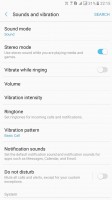
Stereo mode is optional
One interesting thing about the C9 Pro is that it only plays multimedia sounds in stereo mode. Also, the phone lets you disable stereo mode entirely and play all sounds from the bottom speaker only. If you ask us, it's better to have it turned on at all times, we just would have preferred it if Samsung had implemented it properly as the stereo effect and even the actual quality of the speakers isn't great.
Fortunately, the phone still comes with a standard headphone jack and the in-ear headset provided in the box is also good quality, and has built-in remote controls.
The fingerprint sensor performance on the C9 Pro is a bit of hit or miss. While it is fast and you don't even need to press down on the home button to unlock, it is still frequently bamboozled if you use the finger at a slightly odd angle or use one of your lesser used saved prints. For example, while we had both our left and right thumb prints saved, the right one was used most often and the few times the left print was used the phone would often fail to recognize unless the thumb was very precisely on the button, which wasn't the case with the right thumb.
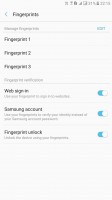
Fingerprint settings
Also, for whatever reason, Samsung only lets you save three prints on this phone unlike five on most other devices, including some of Samsung's own. Samsung frequently does this on its cheaper phones, as if there is some weird correlation between the amount you pay for your phone and the number of fingers you can have recognized.


Tip us
2.1m 180k
RSS
EV
Merch
Log in I forgot my password Sign up