Oppo Find X review
It's Android and Color OS
The Oppo Find X runs on ColorOS 5.1, based on Android 8.1 Oreo. The launcher benefits from a so-called AI engine with real-time translation, faster Face Unlock, navigation gestures, even better gallery, enhanced split-screen multi-tasking. Introduced with v5.0 are also new app shortcuts (long tap), redesigned icons and themes, improved call history, new security features including safe, and better gaming mode with WeChat integration.
ColorOS customizations run deep, making it far off from the standard Google-developed mobile experience. Units sold outside of China still come with the full Google suite, which has resulted in having a few apps with similar functionality - one by Oppo, and another one by Google.
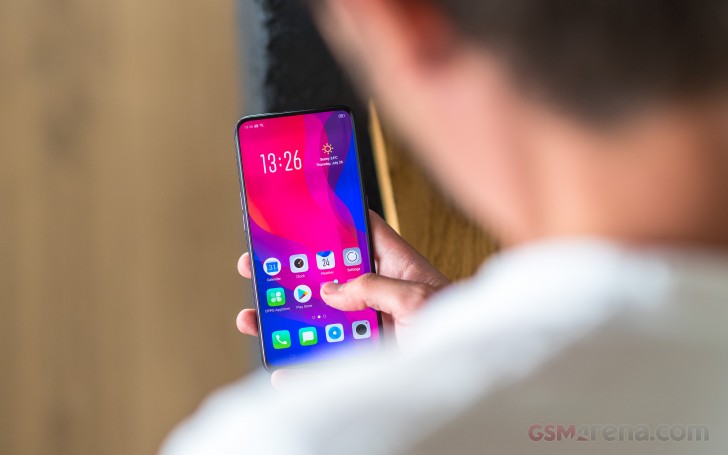
ColorOS isn't that bloated, but it's not "pure Android" either. It comes pre-loaded with social networking apps, a document editor, and few minor-footprint apps.
The so-called AI builds on-device user behavior models for faster app startups and better resource management. It also uses this behavior to show relevant information on the left-most homescreen pane - calendar appointments, quick shortcuts, weather, world clock, package tracking, flight info, among others. You can configure those, or just leave them to the "AI."
The user interface is very familiar. There's no app drawer on the default launcher. Instead, every app you install gets dumped onto the homescreen.
The Lockscreen features a continually changing slideshow of images. You can subscribe to several different channels (e.g., photos of nature or cars or others) or provide your own imagery.

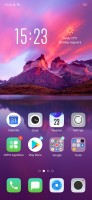
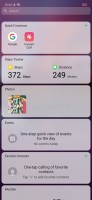
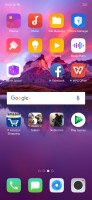
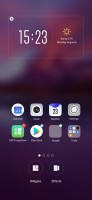
Lock and home screens
There is no fingerprint scanner on the Find X, the only biometric security is the 3D facial scanning. It's the real deal, though, not a camera-only solution as the Face Unlock on previous Oppo phones was set up. Oppo uses structured light like the iPhone X does and projects 15,000 dots that help it read your face in three dimensions with "millimeter-level" accuracy. The company calls this O-Face (not the best name if you ask us).
Oppo boasts about the reduced false positive rate compared to fingerprint readers - 1/1,000,000 instead of 1/50,000. That's the same rate as Apple claims, even though Oppo's phone uses only half as many points.
The Face Unlock works exactly like on the iPhone X - it recognizes just one face (unless you have a twin). It adapts for your facial hair, so you won't have to worry about that either. And it works even in pitch dark, as it uses infra-red light. There is one additional feature you can use - you can enable a requirement for looking into the screen for a successful unlock. This way you won't unlock you screen accidentally, but it may be an issue if you wear sunglasses.

Face Detection settings
Anyway, this mini Kinect tech is what makes the iPhone X notch one of the widest on the market. Some makers made fun of Apple and claimed their notches are narrower, but Oppo just one-upped them all.
That comes at a bit of a price, though. The pop-up module needs 0.5s to slide out - that's faster than the vivo NEX S, but that's still time spent waiting each time you want to unlock your phone. That said, the system still works surprisingly fast. A fingerprint reader would have been a welcome fallback, though.
The scanner is used for more than unlocking the phone or securing AliPay transactions. Its output can be fed to an AI for 3D Smart Selfie Capture. The AI will offer suggestions on how to pose and your expression for more natural photos with the 25 MP front camera.
It also enables lighting effects that can, for example, simulate a two-color studio setup - lighting one side of your face with red and the other with blue light. The scanner can also generate animated 3D cartoon avatars, or 3D Omoji, as Oppo calls them. You can create videos of them and send them through chat apps.
Now let's go back to Color OS. As any other Oppo, you can spruce up the Find X with Themes. The Theme Store features both whole themes and just wallpapers, sorted into categories (including free and paid ones). Themes change the icon pack, the lockscreen wallpaper, and even the system font.


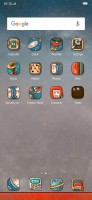


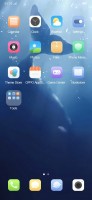
Themes
The notification shade features notifications, quick toggles, and a brightness scrubber.

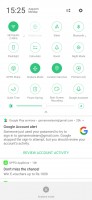
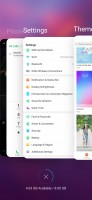


Notifications • Toggles • Task Switcher • Split screen • Split screen
One of the most notable additions to Oppo's custom ROM has to be the Full-Screen Gesture model. Bigger display and diminishing bezels and chins tend to pose some ergonomic concerns beyond a certain point. Oppo's current design might not be exactly there yet, but the company is already trying its best to prepare for that.
When enabled, Full-Screen Gesture navigation positions three small lines at the bottom of the UI but you can choose to hide those lines. Swiping up from the middle one acts like a home button but if you stop the gestures mid-way - you'll summon the task switcher (like on the iPhone X). Swiping on the left or right ones acts as Back. You can change one of those to open the recent apps manager if you like - we sure did.
If you don't like these controls, there is a standard Android navigation bar to fall back to as well.
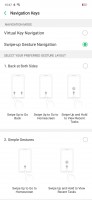
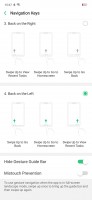

Navigation settings
Clone apps and file safe functions are on board, as well as real-time translation thanks to an improved voice assistant.
There is a Phone Manager quite similar to what Huawei and Xiaomi have the same name. It handles memory cleaner functions, app permissions and encryption, and virus scan, among other things.
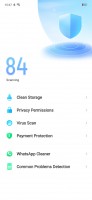


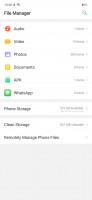
Phone Manager • Game Settings • Gallery • Files
An improved Game Center allows you to handpick which notifications to pass through when you are playing with friends. It now supports WeChat Voice integration, so no more switching to WeChat if you get a call.
And while we are talking about games - there is a hidden pop-up for apps running in full-screen, mostly games. If you swipe from the left side when the Find X is in landscape position, you'll get an arc with various shortcuts - screen snap, screen video capture, messages, notification switch, and WeChat floating window. Those should come in handy in various occasions, so it's nice to have them.


Pop-up shortcuts available in full-screen apps
Finally, there are various screen-off and screen-edge gestures available, if you are into those. You can also opt for Always-On Display, too, it's called Screen Clock and you can configure it from the display settings.

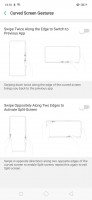


Gestures • Edge gestures • Screen-off gestures • Always-on display
Performance and benchmarks
The Oppo Find X is powered by the most current Qualcomm chipset - the Snapdragon 845. It's the same SoC found in many flagships including the OnePlus 6, Xiaomi Mi 8, LG G7, the latest Xperia phones, among others.
So, the Snapdragon 845 should be quite familiar to our regular readers - it has an octa-core Kryo CPU, and a powerful Adreno 630 GPU. The Find X is equipped with the whooping 8 gigs of RAM, which is really nice.
Now let's run some benchmarks.
First, we did some CPU Geekbenching. Samsung's and Apple's custom cores have more oomph per unit as evidenced by the results in the single-core test. The Find X posted similar numbers to the other Snapdragon 845 phones we've tested.
GeekBench 4.1 (single-core)
Higher is better
-
Apple iPhone X
4256 -
Samsung Galaxy S9+
3771 -
vivo NEX S
2466 -
HTC U12+
2456 -
Sony Xperia XZ2
2454 -
OnePlus 6
2450 -
Xiaomi Mi 8
2431 -
LG G7 ThinQ
2395 -
Oppo Find X
2322 -
Huawei P20 Pro
1907 -
Meizu 15
1620 -
Oppo R15 Pro
1612
In the multi-core test, the Oppo Find X scored slightly below its fellow S845 phones, though there are no reasons to dig deeper here.
GeekBench 4.1 (multi-core)
Higher is better
-
Apple iPhone X
10215 -
vivo NEX S
9160 -
OnePlus 6
9011 -
HTC U12+
9001 -
Samsung Galaxy S9+
8883 -
LG G7 ThinQ
8865 -
Xiaomi Mi 8
8494 -
Sony Xperia XZ2
8466 -
Oppo Find X
8018 -
Huawei P20 Pro
6679 -
Meizu 15
5877 -
Oppo R15 Pro
5809
The Adreno 630 in the S845 is among the best mobile GPUs right now, handling effortlessly everything even when running on 1440p screens.
GFX 3.1 Manhattan (1080p offscreen)
Higher is better
-
Oppo Find X
60 -
HTC U12+
60 -
vivo NEX S
60 -
OnePlus 6
58 -
LG G7 ThinQ
57 -
Sony Xperia XZ2
55 -
Xiaomi Mi 8
53 -
Apple iPhone X
51 -
Samsung Galaxy S9+
47 -
Huawei P20 Pro
40 -
Oppo R15 Pro
15 -
Meizu 15
15
Well, in the case of the Oppo Find X, the GPU is in charge of an extended 1080p screen, which means even more processing power than the 1440p bunch (S9+, G7, U12+) when it comes to real applications. And the Find X pumps out similar theoretical frame rates as the Xiaomi Mi 8, Sony Xperia XZ2 and even the iPhone X. The score is just a step behind other 1080p devices such as the OnePlus 6 and vivo NEX S - but those have a few pixels less to worry about.
GFX 3.1 Manhattan (onscreen)
Higher is better
-
OnePlus 6
55 -
vivo NEX S
55 -
Sony Xperia XZ2
51 -
Oppo Find X
50 -
Xiaomi Mi 8
50 -
Apple iPhone X
44 -
Huawei P20 Pro
37 -
HTC U12+
33 -
LG G7 ThinQ
30 -
Samsung Galaxy S9+
24 -
Meizu 15
15 -
Oppo R15 Pro
12
Antutu is among the more popular tests as a single tell-all number, and in our testing the Oppo Find X beat all smartphones we've tested so far and won the first spot in the chart.
AnTuTu 7
Higher is better
-
Oppo Find X
291218 -
vivo NEX S
287081 -
OnePlus 6
264200 -
HTC U12+
263696 -
LG G7 ThinQ
259393 -
Sony Xperia XZ2
259244 -
Samsung Galaxy S9+
246660 -
Xiaomi Mi 8
217298 -
Huawei P20 Pro
209884 -
Oppo R15 Pro
146526 -
Meizu 15
125444
We can only praise the Oppo Find X as it delivers top-notch performance. The Color OS is well optimized and doesn't bog down Android since it is lean and snappy. Running a benchmark repeatedly slows the phone a bit. But the difference in the scores was minor, while the glass body didn't heat up to worrisome levels. And if it weren't for the minor difference in the tests' scores, we wouldn't have noticed the throttling at all.
So, the Oppo Find X is equipped with the fastest chip available today, runs smooth and lag-free, the interface is snappy, and hardly anyone will be able to notice any throttling. And that's how it should be on a flagship device, so, good job, Oppo!


Tip us
2.1m 180k
RSS
EV
Merch
Log in I forgot my password Sign up