Full musical keyboard
Nokia 5730 XpressMusic review: Full musical keyboard
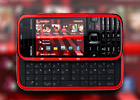
Very good display
The Nokia 5730 XpressMusic may lack the thin and compact body of its candybar counterpart but full QWERTY keyboard is not its only edge. Screen estate is another major point in favor. The Nokia 5730 XpressMusic has a nice 2.4” QVGA display of great sunlight legibility. In direct sunlight, even if the colors get washed out, the display remains perfectly readable even on the brightest of days.
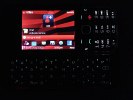
The display has very decent picture quality
Brightness levels are good and contrast is pretty decent. In terms of size, the 2.4" screen of the 5730 is acceptable but it sure feels like – at least for some users – a 2.6-incher could’ve been a better deal than N-Gage buttons.
Excellent QWERTY, middling numpad
The alphanumeric keypad of the Nokia 5730 XpressMusic is hardly a stunning looker but does an OK job. Tactility is adequate and for the most part the keys have nice and solid press. Our only grudge is the lowest row of keys is somewhat limited by the ornamental front frame – and obviously less comfortable to handle.
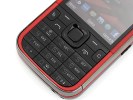
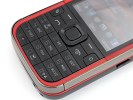

The keypad is decent overall
However, with a QWERTY keyboard as good as this, you are likely to forget the minor drawbacks of the numpad. The keys on the four-row QWERTY are large and provide excellent feedback. The layout is also well thought out, with the stop, the comma and the @ symbol each having a dedicated key. Text selection for cut, copy and paste is extra smooth. You just need to hold down the Shift key and move the cursor with the D-pad.
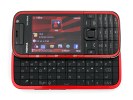
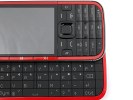
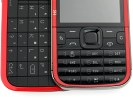
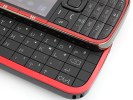
The QWERTY keyboard is almost as comfortable as it gets
The handset is extremely well balanced for a solid hand feel and the QWERTY keyboard will let you take full advantage of the messaging and office document support on the 5730 XpressMusic. Once you slide the phone open, you are in for very comfortable typing and there are very few handsets to rival it. The 5730 XpressMusic is in pretty much the same league as the Nokia E75 and the HTC Touch Pro.
A nice touch to the 5730 is the vast number of customizable options for the slider action. You can pick an application to launch upon sliding the keyboard out and you can set it to return to homescreen upon closing.
S60 3.2 UI: Homescreen redesigned
The Nokia 5730 runs on the Symbian 9.3 OS with S60 3rd Edition user interface. It has Feature Pack 2 but there have been changes since its previous incarnations.
The biggest (and best) change is the Contacts bar option for the standby screen which we also saw while reviewing the 5630 XpressMusic. It is similar to the typical Active standby screen but things have been reordered and as the name suggests - a bar with contacts has been added at the top.
Each contact is represented by the contact photo and their first name - and it's possible to have three contacts visible at a time though the list allows for scrolling left or right.
For each contact you can add an RSS feed, so we guess a nice trick is to add a contact that isn't a person just so that you'll have quick access to your favorite feeds from the homescreen.
Selecting a contact from the Contact bar brings up a screen with info on the contact (a different one than you get if you select the contact from the Contacts list). It has the contact photo, name and phone number. Under that are four buttons - call, send message, update feed and settings.
Bellow that is an area that shows the communications history for that contact - both calls and messages. And finally, at the bottom there are the top two lines from the RSS feed.
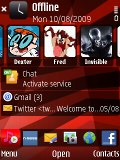
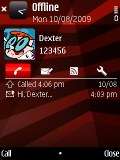
The new Contacts bar • viewing a contact from the Contacts bar
Under the Contacts list, it's pretty much standard Active Standby. First up is info on the email account showing the number of unread messages and sender and Re: fields of the most recent message. Under it is the status and number of friends online for Ovi Contacts, which gets replaced by song info if the music player is running. At the bottom is the shortcuts tab.
The old Active Standby layouts are still here and include Basic - you can assign shortcuts to the D-pad, Horizontal icons bar - the old Active Standby and, finally, the Vertical icons bar, which has only tabs (shortcuts, calendar, music player and personalization) but doesn't hide much of the wallpaper. The last theme variety is the Talking theme which cane be quite useful at times. Only if the voice wasn't sounding that robot-like.

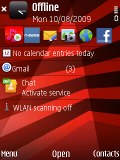
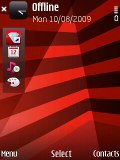
Basic • Horizontal icon bar • Vertical icon bar • Talking theme
Finally, the S60 UI Feature Pack 2 brings some graphical improvements as well, such as animations when browsing the menus.
The task manager has also received a face-lift and now appears on every pop-up menu. It's actually placed on top of every list, which can be a little irritating at times. Alternatively, you can still use the well-known shortcut of pressing and holding the menu key to bring up the task manager.
The embedded 128MB of RAM are an important factor for OS performance. In Symbian terms 128MB is virtually impossible to deplete even with several applications running in the background. You shouldn't expect any memory full warnings on your Nokia 5730 XpressMusic.
The 369 MHz ARM 11 CPU is fast enough (although not as snappy as the new 600 MHz first seen in 5630 XpressMusic). Navigating the menus is quick with an instant response to user commands. The blue circle next to the icon of a running application is a well known Symbian indication reminding users to quit unwanted applications that are still running in the background.
As with all Symbian phones, there is a built-in voice recognition system. It does a good job, being fully speaker-independent and recognizing a fairly high percentage of our commands.
Telephony
Signal reception is great on the Nokia 5730. The phone has commendable speaker quality and the sound during calls is clear and free of any interference. Vibration is also strong enough to make sure you never miss an incoming call or message.

Calling Dexter on the Nokia 5730
The results from our loudspeaker test are at your disposal - unfortunately, Nokia 5730 XpressMusic turned out to be an average performer in this respect. You can't count on getting just everything in noisier environments, and calm and subdued ringtones surely won't do. Still, though the phone may not be as loud as others, playing music through the loudspeaker sounds quite nice.
Check out the table showing how it stacks up beside some of the handsets we've put to the same test. To find more details about our test, as well as the results of all other tested handsets follow that link.
| Speakerphone test | Voice, dB | Ringing | Overall score | |
| Apple iPhone 3G | 66.1 | 62.1 | 71.7 | |
| Nokia 5730 XpressMusic | 68.7 | 61.7 | 75.1 | Average |
| Nokia 5800 XpressMusic | 75.7 | 66.5 | 68.5 | Good |
| LG KM900 Arena | 70.9 | 68.2 | 78.3 | Good |
| Nokia 5320 XpressMusic | 74.3 | 66.6 | 78.3 | Very Good |
| Samsung M7600 Beat DJ | 75.7 | 75.7 | 77.8 | Excellent |


Tip us
2.1m 180k
RSS
EV
Merch
Log in I forgot my password Sign up