iQOO 11 review
Android 13 and Funtouch 13 on our international unit
The iQOO 11 runs Android 13 with a proprietary layer on top, which varies depending on where you are in the world. The China-bound version is called Origin OS, while we get the 'international' Funtouch OS - v13, to be specific.
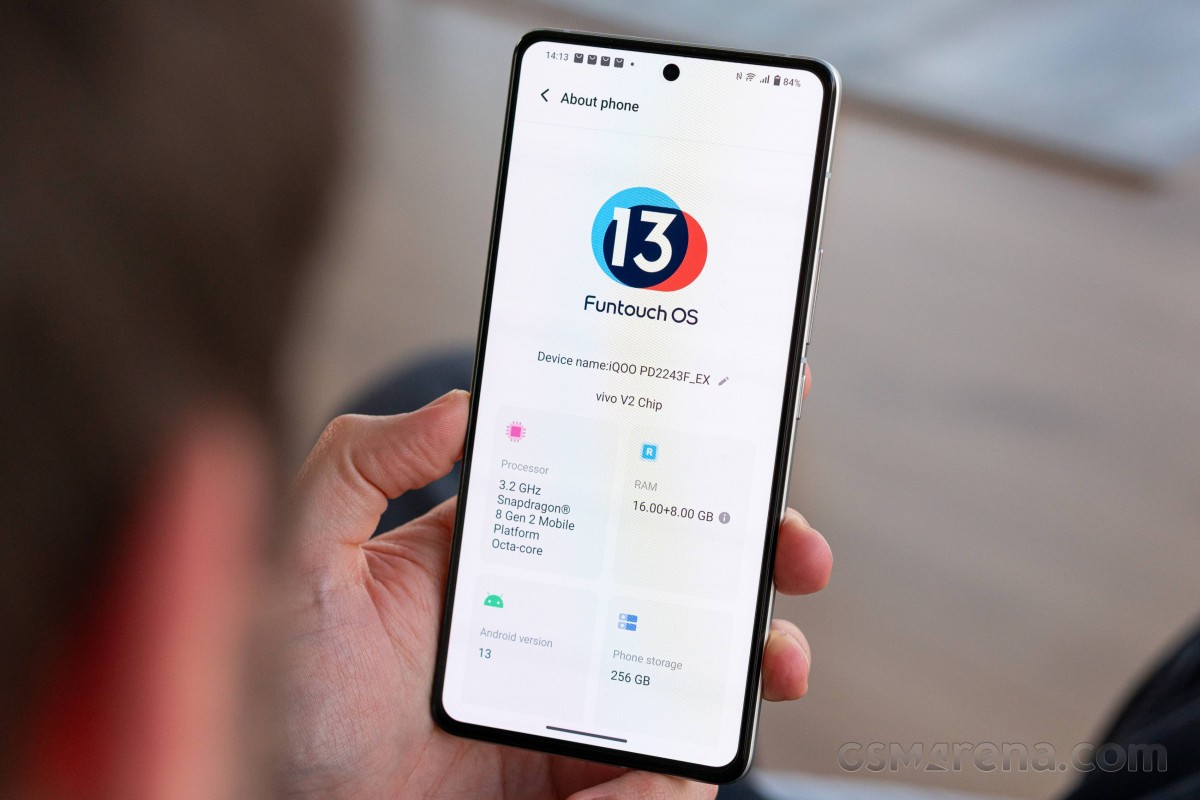
Our latest run-ins with Funtouch were with the 12 version on the vivo V25/X80 Lite and the iQOO 9T, and this new iteration isn't at all different in look and feel. And it's a pretty customized and customizable experience.




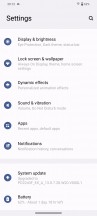

Lockscreen • Homescreen • Folder view • Settings menu
One of the useful proprietary features can be found in the recent apps menu. You can choose between the standard carousel formation and a horizontal tiles layout - sort of like MIUI, only scrollable horizontally. The setting is available right then and there - you don't need to look for it in the menus.
The notification shade is pretty familiar, and Funtouch is staying away from Google's large bubble-style quick toggles - it's simple circular buttons here. The default accent color here is blue and can be controlled via the Android 12 AOSP color palette interface. A powerful theming engine is still present.
The app drawer has an expandable recommended apps category on the top (most commonly used ones), whereas using the vertical scroller on the right would highlight the apps beginning with the selected letter.


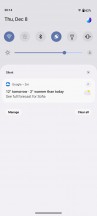

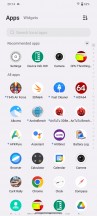

Recent apps • Recent apps • Notification shade • Quick toggles • App drawer
The rest of the UI has plenty of non-stock bits. In the Dynamic effects sub-menu, vivo has grouped a bunch of customization options for the home screen, lock screen and animation effects. There are even various charging and facial recognition animations.
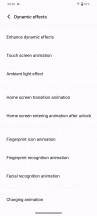
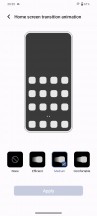


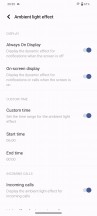

Dynamic effects
The always-on display settings are in a different sub-menu, but the phone still gives you plenty of options to tinker with - a wide selection of animations, clock styles, colors, backgrounds.






Always-on display
The Sound menu holds a few pleasant surprises. Just like Samsung and its OneUI, Funtouch takes care of people with hearing problems, and you can calibrate the sound to be heard by elderly people or those with impaired hearing. Additionally, notifications and calls get separate volume sliders. The vibration intensity can be adjusted for calls and notifications independently. No system-wide equalizer is available for the loudspeaker, though, which could be either a negative or a positive, depending on how you look at it. An Audio Super Resolution toggle is thrown into the mix.
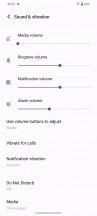




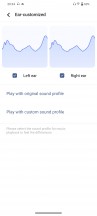
Sound options
The Smart motion menu holds a handful of familiar screen-on and screen-off gestures along with some new additions. One of those requires you to wave in front of the screen during an incoming call to answer hands-free - useful if you're cooking, for example.




Smart motion menu
Holding the volume down key can be used to launch an app or do a certain task, although the list is limited to the camera app, turning on/off the torch or starting recording audio and opening Facebook for some odd reason. The so-called Quick action feature doesn't work when playing music for obvious reasons. Why isn't there a double-press option for Quick action, though?




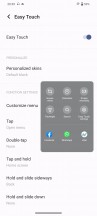
Shortcuts and accessibility • Quick action • S-capture • Screen-split • Easy Touch
A dedicated Ultra Game Mode is available, and it has it all. Most of the features are about mitigating disturbance during gameplay or preventing certain apps from displaying notifications. One of the most intriguing features that have been around on vivo phones for a while is the ability to turn off the screen and keep the game running in the background. Especially useful for turn-based games or those requiring some sort of "farming" and "grinding".






Ultra Game mode
Having all of these customizable gestures, actions and additional features around is cool, but we can't help but wish that Funtouch would have done a better job of organizing them - and that's been a recurring complaint. As things currently stand, it is hard to find certain options, even when you know for a fact that they exist and consequently, discovering new things is even harder.
Performance and benchmarks
The iQOO 11 is the first handset to come into our office with a Snapdragon 8 Gen 2 - what's going to be the definitive chipset for high-end Android smartphones for at least the next six months. We went into more detail on the generational improvements on the announcement date, but the key takeaways are 35% higher performance and 40% improved efficiency of the CPU thanks in no small part to a reworked core configuration (1+2+2+3 in place of the 1+3+4 of before), 25% and 45% performance and efficiency bumps on the GPU side, and support for new, faster memory technologies (LPDDR5X and UFS 4.0).

There's also the in-house V2 chip, developed by iQOO's parent company vivo, which kicks in for night-time photos and video, but is also at play in gaming applications.
We decided to start things off in the benchmark section with some storage speed testing to check out how that UFS 4.0 standard compares to the UFS 3.1 of yesteryear's flagships. So, the numbers show that if you do a lot of sequential read or write tasks on your phone (everyone is a content creator in 2022), you'll see massive benefits from the new type of storage indeed. Random write speeds also get a noticeable bump, and that should be felt across more types of use cases than just moving large video files.
Androbench, Sequential Read, MB/s
Higher is better
-
iQOO 11
3469 -
vivo X80 Pro
1779 -
Samsung Galaxy S22 Ultra
1753 -
Google Pixel 7 Pro
1358
Androbench, Sequential Write, MB/s
Higher is better
-
iQOO 11
2680 -
vivo X80 Pro
1405 -
Samsung Galaxy S22 Ultra
1323 -
Google Pixel 7 Pro
754
Androbench, Random Read, MB/s
Higher is better
-
iQOO 11
330 -
Samsung Galaxy S22 Ultra
320 -
vivo X80 Pro
312 -
Google Pixel 7 Pro
182
Androbench, Random Write, MB/s
Higher is better
-
iQOO 11
466 -
vivo X80 Pro
370 -
Samsung Galaxy S22 Ultra
270 -
Google Pixel 7 Pro
222
And now, back to our regular scheduled programming. Or, rather, the standard set of benchmarks. The SD 8 Gen 2's advantage over the previous gen is already evident in the CPU-only Geekbench, where even the overachieving Zenfone 9 (SD 8+ Gen 1) is a good 10% behind, while other SD 8+ Gen devices are typically scoring 15-20% below the iQOO.
GeekBench 5 (single-core)
Higher is better
-
iQOO 11
1479 -
Realme GT2 Explorer Master
1336 -
Xiaomi 12S Ultra
1324 -
Asus Zenfone 9
1313 -
Huawei Mate 50 Pro
1277 -
iQOO 9T
1276 -
Motorola Edge 30 Ultra
1276 -
Tecno Pahntom X2 Pro
1248 -
Xiaomi 12T Pro
1238 -
Realme GT2 Pro
1238 -
vivo X80 Pro
1184 -
Galaxy S22+
1165 -
OnePlus 10T
1043 -
ROG Phone 6D
1015 -
OnePlus 10 Pro
975 -
Xiaomi 12T
925
GeekBench 5 (multi-core)
Higher is better
-
iQOO 11
4803 -
Asus Zenfone 9
4338 -
Xiaomi 12S Ultra
4300 -
Motorola Edge 30 Ultra
4265 -
Xiaomi 12T Pro
4081 -
iQOO 9T
4059 -
Realme GT2 Explorer Master
4021 -
Tecno Pahntom X2 Pro
3984 -
Huawei Mate 50 Pro
3839 -
Xiaomi 12T
3756 -
ROG Phone 6D
3531 -
Galaxy S22+
3528 -
vivo X80 Pro
3505 -
Realme GT2 Pro
3501 -
OnePlus 10 Pro
3447 -
OnePlus 10T
3401
The margins in Antutu, in turn, are 18-25% in favor of the newer chip.
AnTuTu 9
Higher is better
-
iQOO 11
1281665 -
Asus Zenfone 9
1083092 -
Motorola Edge 30 Ultra
1074722 -
iQOO 9T
1045901 -
Realme GT2 Explorer Master
1045876 -
Xiaomi 12S Ultra
1039412 -
Xiaomi 12T Pro
1032185 -
vivo X80 Pro
1002570 -
Huawei Mate 50 Pro
979921 -
Realme GT2 Pro
966251 -
Tecno Pahntom X2 Pro
961576 -
ROG Phone 6D
948594 -
Galaxy S22+
886916 -
OnePlus 10 Pro
886248 -
OnePlus 10T
786238 -
Xiaomi 12T
780204
In onscreen graphics benchmarks, the iQOO 11's fps numbers are hampered by its 1440p resolution if you compare it against 1080p-screened rivals with the old silicon. Comparisons against 1440p models with the previous-gen chip, on the other hand, do reveal a significant improvement - to the tune of a 40% higher fps count. Should you choose to run the iQOO 11 at the 1080p display setting, you'll be getting substantial gains in performance.
GFX Aztek ES 3.1 High (onscreen)
Higher is better
-
iQOO 11 (1080p)
89 -
Asus Zenfone 9
67 -
iQOO 9T
65 -
Motorola Edge 30 Ultra
65 -
ROG Phone 6D
61 -
OnePlus 10T
60 -
Realme GT2 Explorer Master
59 -
Tecno Pahntom X2 Pro
59 -
iQOO 11
54 -
Huawei Mate 50 Pro
52 -
Xiaomi 12T Pro
50 -
Galaxy S22+
50 -
Xiaomi 12S Ultra
38 -
OnePlus 10 Pro
37 -
Realme GT2 Pro
36 -
vivo X80 Pro
34
GFX Aztek Vulkan High (onscreen)
Higher is better
-
iQOO 11 (1080p)
91 -
Asus Zenfone 9
69 -
iQOO 9T
67 -
ROG Phone 6D
64 -
Motorola Edge 30 Ultra
62 -
Tecno Pahntom X2 Pro
62 -
OnePlus 10T
60 -
Realme GT2 Explorer Master
59 -
Xiaomi 12T Pro
58 -
iQOO 11
55 -
Huawei Mate 50 Pro
55 -
Galaxy S22+
51 -
OnePlus 10 Pro
41 -
Xiaomi 12S Ultra
39 -
Realme GT2 Pro
39 -
vivo X80 Pro
34
GFX Car Chase ES 3.1 (onscreen)
Higher is better
-
iQOO 11 (1080p)
110 -
Asus Zenfone 9
89 -
iQOO 9T
87 -
Motorola Edge 30 Ultra
73 -
Tecno Pahntom X2 Pro
71 -
ROG Phone 6D
71 -
Huawei Mate 50 Pro
68 -
Galaxy S22+
68 -
iQOO 11
67 -
Xiaomi 12T Pro
65 -
OnePlus 10T
60 -
Realme GT2 Explorer Master
60 -
Xiaomi 12S Ultra
51 -
OnePlus 10 Pro
48 -
Realme GT2 Pro
48 -
vivo X80 Pro
44
Turning to the offscreen tests for the raw performance comparisons, we're seeing the iQOO 11 back to its position in a league of its own. Well, at least until the rest of the SD 8 Gen 2s start pouring in.
GFX Aztek ES 3.1 High (offscreen 1440p)
Higher is better
-
iQOO 11
62 -
iQOO 9T
46 -
OnePlus 10T
46 -
Realme GT2 Explorer Master
46 -
Asus Zenfone 9
46 -
Xiaomi 12S Ultra
46 -
Huawei Mate 50 Pro
45 -
Xiaomi 12T Pro
45 -
Motorola Edge 30 Ultra
43 -
ROG Phone 6D
43 -
OnePlus 10 Pro
43 -
Tecno Pahntom X2 Pro
42 -
Realme GT2 Pro
42 -
vivo X80 Pro
41 -
Galaxy S22+
31
GFX Aztek Vulkan High (offscreen 1440p)
Higher is better
-
iQOO 11
69 -
iQOO 9T
52 -
Asus Zenfone 9
52 -
Huawei Mate 50 Pro
51 -
OnePlus 10T
51 -
Xiaomi 12S Ultra
51 -
Xiaomi 12T Pro
50 -
Realme GT2 Explorer Master
50 -
OnePlus 10 Pro
48 -
ROG Phone 6D
46 -
Realme GT2 Pro
46 -
Tecno Pahntom X2 Pro
44 -
Motorola Edge 30 Ultra
43 -
vivo X80 Pro
37 -
Galaxy S22+
34
GFX Car Chase ES 3.1 (offscreen 1080p)
Higher is better
-
iQOO 11
128 -
Asus Zenfone 9
104 -
Xiaomi 12S Ultra
104 -
iQOO 9T
103 -
OnePlus 10T
103 -
Realme GT2 Explorer Master
103 -
Huawei Mate 50 Pro
101 -
Xiaomi 12T Pro
100 -
OnePlus 10 Pro
97 -
Realme GT2 Pro
95 -
Motorola Edge 30 Ultra
93 -
vivo X80 Pro
90 -
ROG Phone 6D
84 -
Tecno Pahntom X2 Pro
82 -
Galaxy S22+
76
3DMark Wild Life Vulkan 1.1 (offscreen 1440p)
Higher is better
-
iQOO 11
12738 -
Xiaomi 12S Ultra
10533 -
Asus Zenfone 9
10469 -
Huawei Mate 50 Pro
10468 -
Motorola Edge 30 Ultra
10248 -
vivo X80 Pro
9778 -
OnePlus 10 Pro
9610 -
Realme GT2 Pro
9487 -
ROG Phone 6D
8666 -
Tecno Pahntom X2 Pro
7499 -
Galaxy S22+
7405
3DMark Wild Life Extreme (offscreen 1440p)
Higher is better
-
iQOO 11
3514 -
Huawei Mate 50 Pro
2753 -
Xiaomi 12T Pro
2740 -
ROG Phone 6D
2555 -
Tecno Pahntom X2 Pro
2393
Naturally, sustained performance isn't amazing on these top-end chips, but the iQOO 11 still manages a very respectable showing in the CPU throttling test, where it ramps down gradually and settles around the 80% mark. Continued GPU load does have a more dramatic effect on the numbers, however - again, nothing out of the ordinary.
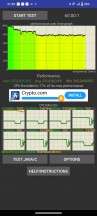
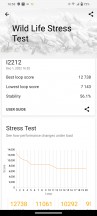
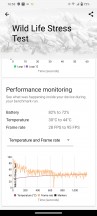
CPU Throttling test • 3D Mark Wild life stress test


Tip us
2.1m 180k
RSS
EV
Merch
Log in I forgot my password Sign up