Small communicator for the pretentious
HP iPAQ rw6815 review

A display with few defects
The size of the display respects the size of the entire device. Technically it is a standard display with resolution of 240 x 320 pixels, able to display 65K colors. The small size of the display has impact on certain activities, like auto navigation for example. The font size is user configurable; nonetheless, the tiny virtual keypad seems as if on the edge of usability. The intensity levels of the display backlighting are superb. Its highest level is extremely comfortable on sunny days, while its lowest one becomes relevant at night, when backlighting gets as strong as to provide perfect legibility.


A touch on the bright display creates “waves” that go away horizontally
The display suffers from a minor defect: when touched with the stylus, both its left and right edges get waved on and change their color. It is pretty similar to a touch on a LCD display, but it’s not a tragedy. Perhaps you would have not even noticed it if we had not brought it to your attention.
OS and control
HP iPaq rw6815 features the operational system Windows Mobile 5 with AKU 2.0 update pack. Some of the most significant novelties here are Direct Push (detailed further on) and the new Bluetooth with the A2DP profile, which allows you to listen to music through wireless stereo earphones.


Windows Mobile user interface and the respective detailed information
Here are a few comments regarding the operational system for beginners. Those acquainted with Windows Mobile can skip this paragraph. We often run into the opinion that the Windows Mobile OS should logically be identical to Windows for PCs, thus new users should effortlessly get used to its interface and control modes. Unfortunately, the only common part in both systems is their Start menu; everything else is rather different. Of course, multitasking is part of Windows Mobile, but you will not find a bar with running applications, for example. If you want to switch between two running applications, you need first to select the one that is to be open in the menu, just as if you are to run it all over again. The icon in the top right corner changes between the “x” and the OK keys according to the corresponding application. And finally, a click on the “x” key does not close the respective application, but only minimizes it. To terminate an application you have to use the following options: start-settings-system-memory-running application. Windows Mobile should have been designed in such a way that it remains fast and stable without having to close running applications. Those of you with longer experience with this OS, however, will surely agree with us that it does not always work this way, especially in the case of more complicated applications and in terms of available memory.
For no beginner will Windows Mobile look user-friendly, at least not at the very beginning. Fortunately, there are plenty of applications facilitating the work with active processes. They enable for fast shifts between applications, their termination, etc. In other words, they provide the assistance the operational system does not, even though it should have been able to.
Control is somewhat inconvenient and slow. The high amount of negative remarks in this respect in the past has made the manufacturer implement a few improvements in the last version Windows Mobile 5. Yet, the result could hardly be satisfying if the communicator manufacturer does not participate in the innovation, and it is sad to say, but in the case of rw6815 HP has not participated at all. On one hand, iPaq rw6815 is a communicator managed through a stylus, and we appreciate this. On the other hand, however, it is also a mobile phone, and as such it should have been able to provide users with quick and easy single-hand dialing.
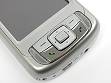


No OK/Close option among the control keys
There is no doubt that the most crucial defect of iPaq rw6815 is the absence of control keys beneath the display, and particularly the one opening the Start menu and the OK/Close one. Instead, the Start menu is opened through a longer press on the green receiver (fixed, non user-configurable option), while OK/Close function has been fully forgotten. Also pay attention to the fact that it is not the center of the control button, but the Enter key that fulfills the OK/Close functions. In practice this means that once having selected an option, you will not be able to confirm it, unless you use the stylus or by aiming a miniature point on the display. Besides, the display is surrounded by quite a high frame, in a result of which its edges are difficult to reach by a thumb. Bear in mind that the two software keys beneath the display are NOT user-configurable. After having tested Palm Treo 650 we had the pleasure to also work with Treo 680, whose hardware keys are an example of control brilliancy.
To sum up, it is mainly Microsoft and its OS Windows Mobile to blame for the user-unfriendly control of iPaq rw6815, but there is no doubt that Hewlett Packard has also played its role and is therefore responsible for the result.


Tip us
2.1m 180k
RSS
EV
Merch
Log in I forgot my password Sign up