Xiaomi Redmi Note 7 review
Android 9.0 Pie with MIUI 10 on top
Xiaomi's custom skin overlay, MIUI, has come a long way and the MIUI 10 takes a more simplistic and clean approach and to be honest, we like the changes introduced here. We've already reviewed the Mi Mix 3, which also runs on Android 9.0 Pie with MIUI 10 on top but we found some small differences with the Redmi Note 7's build.
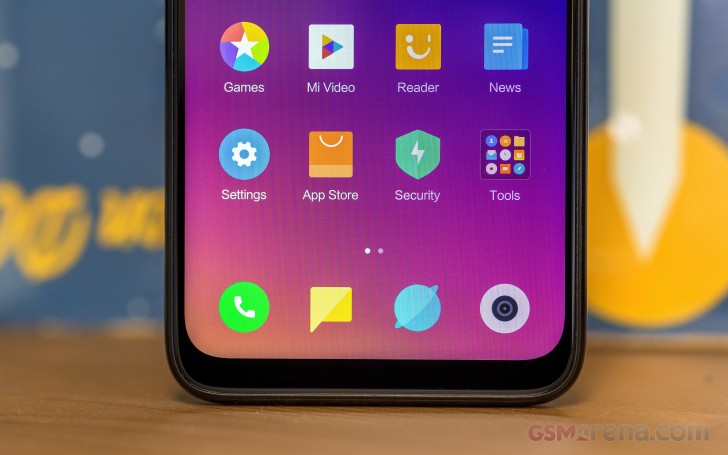
In a typical MIUI fashion, there's no app drawer and no option to enable it too. The task switcher and the notification shade have gone through a major revamp. The quick toggles are more in line with the stock Android 9.0 Pie design while the display brightness slider pops out more. Unfortunately, the shortcut to the settings menu is nowhere to be found, which is a considerable inconvenience if you are used to accessing the Settings menu from here like us.
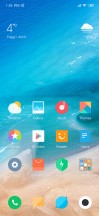


Home screen and notification shade
Swiping right will bring you to the so-called App vault that gives you quick access to commonly used apps, a quick view of Notes, news, etc. And as for the recent app menu, it's vertically stacked, but instead of displaying just one at a time, you can view four apps on the screen.

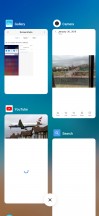
App vault and task switcher
Pressing the volume rocker will bring out the volume control menu but in a pop-up window right next to the buttons. Instead of defaulting to the ring volume, the volume rocker now controls the media volume. Tapping on the three dots will display the ring and alarm controls along with the quick access to the silent and DND toggles. You can even make the DND mode active for a limited time.
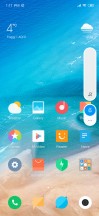
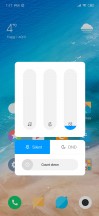
Volume control menu
The Settings menu is largely untouched. Here are all the settings menus.
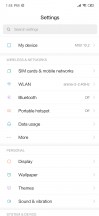
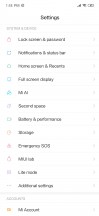
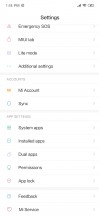
Settings menu
The Display menu doesn't give you any special options - you can only play with contrast, color temperature, and brightness settings.
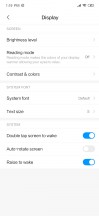
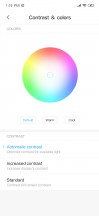
Display menu
Next down the list is the Lock screen & password menu. You will find the fingerprint and face input in there along with some additional settings for the fingerprint scanner. For instance, you can lock individual apps.
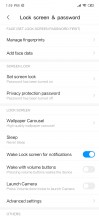

Lock screen, fingerprint scanner options and face recognition input
The Full screen display sub-menu gives you the option of choosing between standard navigation buttons and navigation gestures. They are nothing new to the MIUI, but with the latest build, Xiaomi has refined the gestures even further.
Otherwise, as before, swiping from the left or right act as a back button, swipe from the bottom is the home key and swiping from the bottom and then pause will bring out the recent apps menu. The new addition is the option to directly jump to the previous app by swiping from the left or right and hold. However, we found that this gesture isn't as fast a double tap on the task switching button and also the back gestures get in the way of some swiping gestures in some apps. Like bringing the hamburger menu from the left in the Google Play Store app.
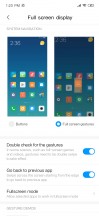
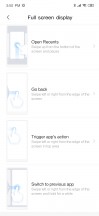
Full screen menu and options
The battery settings menu comes with the good old statistics about which apps have used the most battery since the last full charge and also a power saving mode called "Sleep mode" that turns off all radios and background processes if you haven't touched your phone for a while. You can restrict background apps too to further improve standby battery life, not that you will need to.
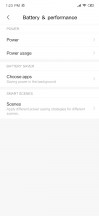

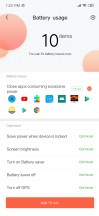
Battery menu and additional power-saving options
Of course, not all features of the MIUI 10 are made available for the Redmi Note 7, but there are also plenty of proprietary Xiaomi apps pre-installed. Here are a couple of them including the Security app that gives you a general overview of the phone's status like battery info, data used, apps locked, etc. But most of the apps are just general organization applications like File Manager, Mi Calculator, Mail, Compass, Screen Recorder, Downloads, QR Scanner, Mi Remote (since it has IR blaster).

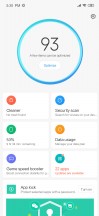
Proprietary MIUI apps and a screenshot from the Security app
Regarding the multiple complaints from our readers about not mentioning the ads which pop on their screens while using MIUI 10, we'll have to say we didn't get any ads on any of the Xiaomi devices we've reviewed so far so they must be strictly regional. And from the user feedback online, it seems you can turn them off easily by either toggling a setting in each of Xiaomi's preinstalled apps which have them or by switching your region to another country. This is by all means not a universal solution and it's best that you research the steps that need to be performed on your own device.
Benchmarks and performance
The Snapdragon 660 is a well-known SoC, and it's not the first time we've tested it. We know what to expect, and we found that it works flawlessly with the MIUI 10. We didn't notice any lags, hiccups or hangs. The device runs smoothly without thermal throttling or performance drops.
The chipset itself incorporates an octa-core CPU with 4x Kryo 260 cores ticking at 2.2 GHz and 4x of the same cores but clocked at 1.8 GHz. This ensures sensibly better performance than the Snapdragon 636, for example, but at the cost of efficiency. The processor is built on the 14nm. Here's how it performed in our benchmark selection and how it stacks against the competition.
GeekBench 4.1 (multi-core)
Higher is better
-
Xiaomi Mi 8 Lite
5894 -
Honor 8X
5651 -
Realme 2 Pro
5531 -
Xiaomi Redmi Note 7
5411 -
Motorola One (P30 Play)
4183 -
Samsung Galaxy A6 (2018)
3718
GeekBench 4.1 (single-core)
Higher is better
-
Xiaomi Redmi Note 7
1650 -
Xiaomi Mi 8 Lite
1628 -
Honor 8X
1618 -
Realme 2 Pro
1462 -
Motorola One (P30 Play)
867 -
Samsung Galaxy A6 (2018)
733
AnTuTu 7
Higher is better
-
Xiaomi Mi 8 Lite
143257 -
Xiaomi Redmi Note 7
139075 -
Honor 8X
137276 -
Realme 2 Pro
132958 -
Motorola One (P30 Play)
81024 -
Samsung Galaxy A6 (2018)
63632
Basemark OS 2.0
Higher is better
-
Honor 8X
2341 -
Xiaomi Mi 8 Lite
2338 -
Xiaomi Redmi Note 7
2260 -
Realme 2 Pro
1911 -
Motorola One (P30 Play)
1324 -
Samsung Galaxy A6 (2018)
1019
GFX 3.0 Manhattan (1080p offscreen)
Higher is better
-
Xiaomi Mi 8 Lite
22 -
Xiaomi Redmi Note 7
22 -
Realme 2 Pro
21 -
Honor 8X
21 -
Motorola One (P30 Play)
9.8 -
Samsung Galaxy A6 (2018)
5.4
GFX 3.0 Manhattan (onscreen)
Higher is better
-
Xiaomi Mi 8 Lite
20 -
Xiaomi Redmi Note 7
19 -
Honor 8X
19 -
Realme 2 Pro
18 -
Motorola One (P30 Play)
18 -
Samsung Galaxy A6 (2018)
9.8
GFX 3.1 Car scene (1080p offscreen)
Higher is better
-
Xiaomi Mi 8 Lite
9 -
Xiaomi Redmi Note 7
9 -
Honor 8X
7.6 -
Motorola One (P30 Play)
3.6 -
Samsung Galaxy A6 (2018)
2
GFX 3.1 Car scene (onscreen)
Higher is better
-
Xiaomi Mi 8 Lite
8 -
Xiaomi Redmi Note 7
7.7 -
Realme 2 Pro
7.2 -
Motorola One (P30 Play)
7.2 -
Honor 8X
6.7 -
Samsung Galaxy A6 (2018)
3.9
Basemark X
Higher is better
-
Xiaomi Mi 8 Lite
21269 -
Xiaomi Redmi Note 7
21201 -
Honor 8X
20416 -
Realme 2 Pro
14576 -
Motorola One (P30 Play)
10524 -
Samsung Galaxy A6 (2018)
5639


Tip us
2.1m 180k
RSS
EV
Merch
Log in I forgot my password Sign up