To the metal
Meizu m3 note review: To the metal
Introduction
We guess many users have always looked forward to the Meizu Note lineup. The m1 note (also known as Blue Charm Note in China) started it all - it boasted a big screen and an overall great package for the price. The m2 note simply widened the LTE network coverage and enabled memory expansion. The latest Meizu m3 note builds upon that with a faster processor, a bigger battery and a more premium, all-metal design.
The Meizu m3 note keeps the 5.5" 1080p display for a third generation in a row, but does well to move on to a more potent Helio P10 chipset backed up by a 4,100mAh battery. The rest of the more prominent features are inherited from the m2 note: a 13MP main camera, 16 or 32GB of expandable storage, LTE connectivity, dual-SIM telephony, and a clever and useful Home button.
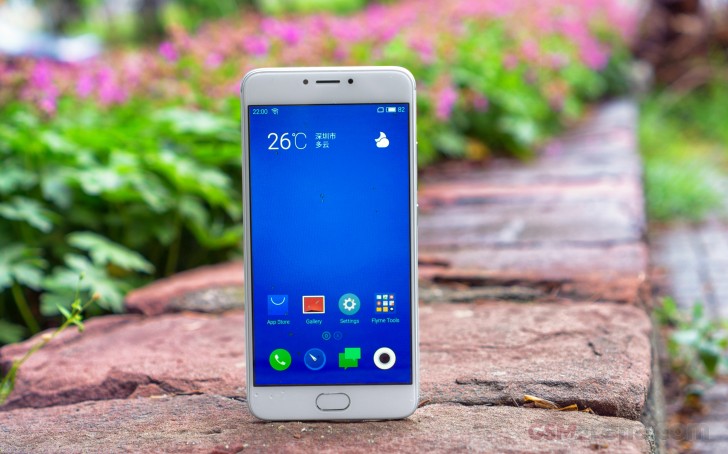
Just like its Pro 5 and Pro 6 siblings, the m3 note incorporates a fingerprint scanner within its single hardware key at the front. But the biggest and most welcome change is surely the premium all-metal design, which improves the looks, hand-feel and build quality over the plastic shells of the first two generations.
Interestingly, the Meizu m1 metal already demoed most of the features the m3 note is now introducing, but its patchy availability was a problem. Hopefully, that's not an issue for the m3 note so let's move on to what we're really getting.
Key features
- 5.5" 1080p LTPS IPS LCD display of 403ppi
- Flyme OS 5 UI on top of Android Lollipop
- MediaTek Helio P10: octa-core Cortex-A53 processor (4x 1.8GHz + 4x 1.0GHz), Mali-T860MP2 GPU, 2GB or 3GB of RAM
- 13MP camera with two-tone LED flash, 1080p video recording @30fps
- 5MP front-facing camera with 1080p@30fps video recording
- 16GB or 32GB of built-in storage; expandable via a microSD slot
- Cat. 4 LTE (150/50Mbps); Dual SIM; Wi-Fi a/b/g/n; Bluetooth 4.1; GPS/GLONASS/Beidou; USB On-The-Go
- mTouch Home button with a fingerprint scanner
- Active noise cancellation via a dedicated mic
- 4,100mAh battery
Main disadvantages
- Launches on Lollipop
- No FM radio or NFC
- No fast charging
- Weaker GPU than the one used in the m1 metal
There are very few notable omissions in the Meizu m3 note and fast battery charging is probably the one that stands out. The Android version is fairly recent but, frankly, the lack of Marshmallow might actually become an issue down the road. Considering Meizu's OS update record, the m3 note isn't too likely to get upgraded. What comes across as a less capable GPU than the m1 metal's is something we'll pay due attention to in the relevant chapter.
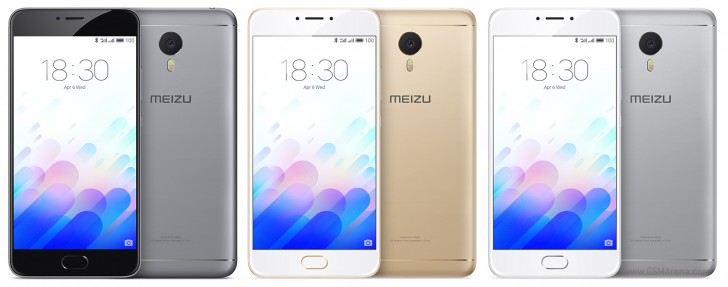
Of course, we are going to try and address all of the key features and potential deal-breakers as we go. So, let's get to it. Our habitual hardware overview follows right after the break.
Special thanks to HonorBuy.com for providing the review unit.
Meizu m3 note review: To the metal - Reader comments
- Googi
- 7j%
Install flyme 6.3, root rights from settings,right afterwards install SuperSU always run mode ,install xposed, install fake gapps, install fdroid,install microg,use arora, enjoy play store free life for most apps,do install root cloak on xposed,sai i...
- Julias
- fnE
hae, I have a problem with my phone(meizum3 note) its locked how can I unlock it?its written in Chinese I can't understand it,need some help please


Tip us
2.1m 180k
RSS
EV
Merch
Log in I forgot my password Sign up